I mentioned the router before. One of the laptops that connects to the router acts mainly as a server, running tasks in the background, and sitting unobtrusively in the trunk. When everything is working well, I can take pictures from in and around the car, and the Eye-Fi card in the camera will send them wirelessly and automatically to the laptop. The laptop will then run a program which looks at the timestamp on the photo and compares it to a gps track log, and figures out where in the world we were at that time, and records geographical data in the picture metadata. The picture is then automatically uploaded to flickr. And when this doesn’t happen automatically, I attempt to do it manually afterward. So there are lots of pictures on flickr. If you want to scan the un-filtered album, point your browser over to http://www.flickr.com/photos/tastewar/tags/xctrip/
Category: Technology
-
Power to the Router!
One problem with the Honda Odyssey is that when you kill the ignition, power to the “power outlets” goes off as well. Wanting to provide internet access with the car off meant doing a little work, so I’ve built an “Automotive UPS (Uninterruptible Power Supply).” Now, I can’t take much credit for this “invention” — most of the ingenuity is embodied in the one piece of electronics in it, which is an automotive UPS module I purchased from PowerStream. It is intended for more permanent installation with a second car battery, but I wanted something more portable, so I connected everything up to a traditional UPS battery. Susan found the perfect case at Target, and I supplemented with a bunch of parts (such as the cigar lighter sockets), mostly from DigiKey.
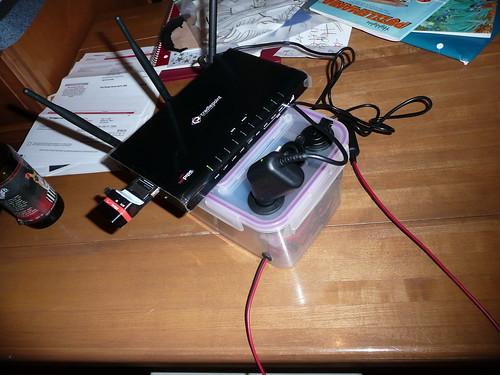
What you see in the picture is my home-built UPS, which will be used to power the router. The router connects to the internet via the Verizon/Kyocera ExpressCard sticking out of the side. When in the car, it connects to an external antenna to hopefully get the widest coverage range. The router then provides internet access to other devices, mostly laptops, through wifi and ethernet.
Interestingly, Verizon offers a device with nearly the same capabilities now, the MiFi:
But in a much smaller package!