Category: Technology

  • This Fan Blows! (but not very well…)

    This Fan Blows! (but not very well…)

    It all started in January, when the cold really settled in. I started to notice that when the furnace was on, the airflow from the vents was inconsistent. In the early morning when it would start up (coming up to the daytime setting from the lower overnight setting), it would blow for a few minutes, but then stop. Then start. Then stop. Etc.

    As with most things in my life that are not a dire emergency, I kind of ignored it for a while. But I eventually called in an “expert” — an HVAC contractor that was on the list of approved contractors from the Bosch web site. They were able to come by a few days later (it was not a “NO HEAT” situation, and there were people without heat). The very polite tech came in and made some changes to the thermostat’s settings, and went on his way. Basically, he changed things so it would use the aux heat (gas furnace) more often, and the heat pump less often. Well, I knew that wasn’t the end of it, because the problem was most evident (to me) when it was using the gas furnace! Sometimes, the furnace would lock out, requiring a circuit breaker reset to get it to try again.

    They came out again about a week later, this time more willing to listen. And the technician was able to experience the problem when it happened, and he said, “Yup — the blower needs to be replaced.” which was what my guess was, too. However, what I didn’t expect was for it not to be covered by warranty (it was installed < 5 years prior), and for the price to be $1827. Yikes! I tried to see if I could get a hold of the original installer, but he was a small contractor doing this kind of work part-time (his full time job was an HVAC technician for M.I.T.), and it seems that he quit doing that kind of work shortly after installing our system. I also tried to find a “warranty friendlier” contractor, but came up empty there as well.

    So I “phoned a friend” who has a lot of knowledge and expertise in this area, and he thought it unlikely that the blower was bad, and that it was more likely that one of the furnace safety switches had gone flaky. The Bosch furnace has a lovely single LED indicator that blinks out a numeric code if there’s a problem. I had only ever noticed it at 11, when it locked out. I told my friend, “If I were smart, I would hook up a webcam and some software to monitor the LED…” but it sounded like a hassle. However, it also seemed like the best way of getting some diagnostic data to get a better handle on what the problem was. If I failed to mention it, this unit is in an attic crawl space, so it’s a pain to get to.

    I then “consulted” with ChatGPT about the idea. It suggested that the camera module (ESP32) I had was underpowered for doing that kind of image analysis work, but that an ESP32 module with a light sensor would be cheaper and the code would be easier. So I set off down that path. “We” were originally going to have 2 light detectors, and put filters over them so we could tell if the LED were lit in green or red. But the filters ended up cutting so much signal that all that was left was noise, and the detector was unreliable. So we ended up with a single detector, essentially attached to the LED via a small tube. And this worked great!

    Meanwhile, I had also purchased and hooked up an airspeed sensor module, so we could monitor the airspeed through the main trunk duct (see the graph above). I was able to show that no matter whether the fan was on manually, or for the gas furnace, or the heat pump, it just ran very unreliably. It would run for a few minutes in a row when cold, but once it warmed up it became very erratic. Then the LED monitor would sometimes show we had gone to code 4, which indicated that the overtemp device kicked in, and had shut down the furnace. Often this would escalate to a code 11, where you would have to manually turn power off and on to get it to reset.

    So all the evidence was pointing to a bad blower, and in fact, to the Electronic Control Module (ECM), which probably had a bad capacitor or something similar. But you can’t just replace the ECM — the motor and ECM are essentially a single unit. So I looked around and found a place to order the blower motor from, and ordered it. It arrived this past Thursday (19 March 2026), and I waited until today (Saturday) when Tyler would be available to help with the install.

    It took just about 2 hours exactly to do the swap. After turning the power off, we had to disconnect a ton of wires,

    and document what needed to be connected where. After that, the entire blower unit with the control board can slide out. Once we had the unit out, we were able to bring it to the basement and do the swap.

    This involved loosening the squirrel cage from the motor shaft, then removing the suspension from the housing. Then getting the squirrel cage all the way off, then removing the suspension from the motor housing.

    That got us to the halfway point, so it was time to turn around and head back — starting with attaching the suspension to the new motor, then the motor to the unit, then the squirrel cage to the shaft. Then we brought everything back upstairs, and reinstalled it into the furnace housing. Finally, we turned the power back on, and monitored and tested everything.

    And we have been successful! Everything now works as expected, and the fan ran for 20+ minutes with the heat on, and turned off when it hit the set point. I then ran the fan manually for 90 minutes, and it ran consistently. So, all looks good! And instead of paying the pros $1827 for this service, we paid $752 for the blower and did the work ourselves, saving over $1000!

    Screenshot
  • Design for Serviceability

    Design for Serviceability

    Panasonic Microwave

    About an hour into a brief, twenty-four hour getaway, I received a not quite panicked call from my mom, letting me know that her microwave (a Panasonic NN-SN733W, bought in August 2015) wasn’t working. She uses the microwave all the time, for heating up water to make tea, and even making a good percentage of her meals. It’s probably the most used appliance in her apartment. Which is mildly ironic, considering how dubious she was of the idea when I bought her her first one. She was a bit disappointed that I wouldn’t be able to deal with it that day, but in the end was accepting of the situation.

    So today, after coming home, one of the first things I did was to take a look at her microwave. And as she had told me, it seemed completely dead — no clock, no light, no nothing. The outlet it was plugged into was good. I explained that generally appliances don’t fail like that. Maybe the turntable motor would fail, or the magnetron, or the control panel. But given that there was zero sign of life, it seemed likely that it was an internal fuse that had blown. So, I began to take it apart. There was one Phillips screw on the bottom of one side holding the shell of the case on, which I removed. But the other half-dozen screws were all security Torx screws! A sign that the manufacturer definitely didn’t want a consumer opening it up (but why have the one plain Phillips? That is a mystery…).

    When I got it open, I could see that the power supply circuit board did indeed have a fuse on it, and the fuse was in a fuse holder, rather than being soldered to the board. Hallelujah! There was hope! It was a ceramic fuse, though, so it wasn’t immediately obvious whether it was blown or not. But a quick check with an ohm meter showed it had blown.

    After returning from the hardware store, about 10 minutes later, I popped the new fuse in, and plugged it in briefly, just to see if the clock would come on, etc. And sure enough it did. So, I unplugged it, put everything back together properly (or nearly so), and had mom try it by heating a cup of water. And it worked! So, all is good, at least for the time being, and another microwave has been saved from the landfill/incinerator.

    But this begs the question — why?? Why make it so that the average consumer couldn’t replace the fuse? Why not make the fuse accessible without taking the whole shell off? A fuse is, or should be, a “user serviceable part.” I can’t quite imagine what the rationale is for making it this way. Is it in the hopes that people will just toss it and buy another? Why not solder the fuse to the board then? Is it to help keep appliance repair shops in business? Seems vaguely plausible, but unlikely.

    I do have the sense that a generation (or two…) ago, people were more accustomed to fixing some things themselves. I am also aware that those “things” were significantly simpler then. An electric stove had a power cord, and from there, the wires went to a bunch of resistive heating elements through a simple, electromechanical control, turning on and off various combinations of heating elements. And a thermostat for the oven. If there was anything else, it was a clock that operated on the 60 Hz AC signal. There were no circuit boards with touch panels, and fluorescent displays to break, which would have to be replaced in whole if something failed. But a fuse? Why bury that where it is unlikely to be discovered except by the most intrepid of owners. While I do appreciate the forward leaps we’ve experienced in functionality, I do believe a lot more could be done to make appliances more serviceable.

  • Objet d’art

    Objet d’art

    Western Electric 1013

    Not everyone is likely to agree with my assessment of this particular artifact, but in my opinion it is a paragon of industrial design. Perhaps nobody loved the Bell System at the time, but the gear they made (which they owned, and you rented) was made to last for decades, which this example certainly has.

    The above photo is of a Western Electric model 1013 Linesman’s butt set, probably from the late 1970’s or early 1980’s. I have a couple of other, more modern sets in my “collection” but this recent addition is really a prized possession for me, for two reasons. First and foremost, this comes from a friend’s father’s collection of tools, and is a beloved memento for that. Second is the rotary dial, which is just one of the most pleasing devices to operate. This is of course what all phones had for the longest time, but the mechanical engineering that went into creating something so reliable is inspiring. This particular rotary dial is mechanically the same as the one that went into Trimline phones, with the slightly odd movable finger stop, that allowed for a more compact design. But because it was a tool that would see heavy use in this particular context, the number plate was done in porcelain. I find it hard to imagine anyone putting that kind of thought and money into a similar product today.

    I really do find the design both pleasing and functional. The shape is essentially the same as a traditional handset from the era, which is very comfortable to hold, and to rest on the shoulder for hands-free use. But in something that isn’t much larger than a handset, they have managed to incorporate an entire working telephone. Even the rubber pad on this specimen is still pliable, indicating that care went into the selection of materials. The cloth covered wires are still supple and the colors easily distinguished. And who could fail to love the orange color?

  • These Are a Few of my Favorite Things

    These Are a Few of my Favorite Things

    ok — one of my favorite things.

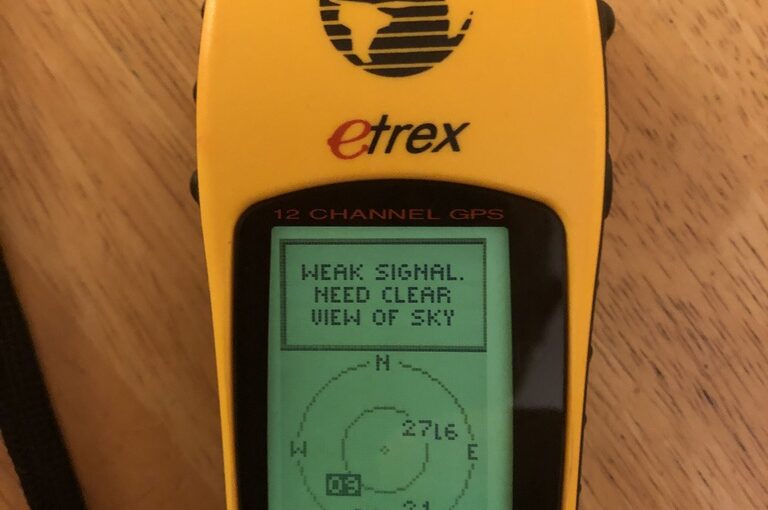
    It’s my old Garmin eTrex! A friend’s son is going to be working at Garmin for the summer, and I was reminiscing about my long history with their products. This was my first — the original eTrex. I can still remember going to a MacWorld exhibition back in 1989 or 1990 and seeing a Sony GPS unit (yes, Sony!). It must have been a Pyxis model, though my recollection was that the antenna unit was spherical rather than just round. Could be faulty memory, or might have been a prototype unit. More likely the former. Anyway, it was of course super expensive, and there was no way I would be able to afford such a thing, but the concept of a (semi) portable device that could tell you (fairly) precisely where you were anywhere on earth seemed pretty magical.

    In any case, GPS technology continued to evolve, and a newish company, Garmin, was producing some interesting devices. A lot of the early devices were aimed at the boating market, where LORAN had been the previous popular means of electronic navigation. There were some handheld units, but the eTrex was (I would say) the first reasonably priced, handheld GPS receiver, oriented towards hiking. And so, I bought one. I used it for hiking, and even toyed with connecting it up with a PocketPC via a cable purchased from a “pfranc” (Purple Open Project Franchisee). If you have a few minutes, the history of those 3rd-party connectors is really fascinating and fun, and Larry Berg is a great example of a hacker’s hacker. I remember being completely absorbed by the story back then, but eventually I lost track of him, and he apparently passed away in 2012. But the other thing the cable was useful for was powering the eTrex in the car. I could also connect it to a laptop via a serial port (and later, a USB-to-RS-232 converter). Because, of course, the eTrex had no built-in mapping capability. It could just tell you where you were. And via a “breadcrumb trail” function, where you’d been. And store waypoints. And point you in the precise direction of a waypoint and tell you how far it was. But it had no concept of roads, or trails, or anything other than location: current, previous, and preset waypoints. But this was enough! I recorded many hikes with my beautiful yellow eTrex that I could then save and post, and overlay the breadcrumb trail on top of topo maps, etc.

    The eTrex was a miracle of technology, but still showed some weaknesses that were common among early GPS receivers. It could take quite some time to get a signal, and it required quite a clear view of the sky in order to receive the signal reliably. For the many years that it was my hiking GPS, you would see me with the unit balanced on top of my hat. No doubt this helped improve my posture. Many times I thought about velcroing it there, but I never actually did.

    One of the great things about GPS was that, being a government designed technology, the standards were published, and while different companies might well choose to implement proprietary physical connectors to their device, the data coming from those devices was all standard, so if you wrote an app to interface with one GPS, with very minor exceptions, you could interface with all of them. A great example of the value of standards!

    After the eTrex, I eventually bought an Edge 705, which was oriented towards biking, and could interface with a cadence meter, a wheel tachometer to more accurately calculate speed, and a heart rate monitor. This had several advantages over the eTrex — it had USB connectivity (via a standard connector, even — way to evolve, Garmin!!), and a rechargeable battery. It had much quicker startup times, and had a much more sensitive receiver. So much so that it spent most of its time in my pocket, resulting in a screen that has suffered many scratches from other pocket paraphernalia. But most of all, it had a mapping capability! I could load street maps on it, and it could calculate routes. I could load topo maps on it, and see what the trail ahead looked like, etc. It even had a color screen! Even after I had a phone that could also do all these things, I still carried the Edge. It did much better with battery life, and it meant I could leave my phone in airplane mode to conserve its battery, and have it available for emergencies.

    But the beautiful thing is that, after 20+ years, the thing still works. Once I cleaned out the leaked battery acid from old alkalines (Duracell, even!), and popped in a fresh pair of AAs, the thing booted up and found the requisite “birds” and was able to give me a location. As always, it had to be outdoors to get a good enough view of the sky, but it still works! I Love It!

  • The Bug Hunt

    A few years ago, someone’s project came up on my Twitter Feed (or elsewhere — it’s been a while, and I don’t remember with certainty) that caught my interest. This happens with an alarming frequency, but most of the time I can stifle the interest sufficiently to avoid ordering all the parts. Our house is littered with projects that I have bought the parts for, but never completed. Projects that are born of my own fevered brain, especially those whose inspiration is a really nifty part or gizmo I’ve come across, are especially susceptible to this fate. And the Classroom Clock started out like many — I purchased the necessary parts, and then they sat there for a couple of years.

    But unlike so many others, this one did eventually come together. Probably at least in part because it was given as a Christmas gift to my wife, Susan, a middle school science teacher. It took some work to get it all together, but then the problem was that the kind of schedule it was originally programmed for didn’t really mesh well with the schedule at Susan’s school. Once I began to get familiar with the code, I realized I didn’t like it very well, so I rewrote most of it from scratch, in a somewhat more generalized way. This past year, I made some more minor updates to it, basically to make it easier to update the schedule and calendar from year to year. The official school clock seems to drift more than the Chronodot that’s at the heart of the Classroom Clock, so periodically I have to re-program the time. The original project didn’t have any means for user input, so there is no way to manually change the time on the clock. In fact, the only way to change the time is to reprogram the clock, and the only way to “synchronize” the time is to calculate exactly how long it takes to upload the code to the clock, and hard-code an appropriate time in the program. Argh!

    My contribution in this area was to write a completely separate program that can be uploaded to the clock, with which you can interactively set the time. Then, you reload the normal clock firmware which no longer attempts to set the clock at all, and everything is good.

    So one time in the fall, Susan’s students apparently wanted the clock to display in 24 hour time. This is of course an easy change. The Chronodot tracks time in 24 hour mode, so it was just a matter of not subtracting 12 from the hours.

    Recently, the delta between the official school clock and the Classroom Clock got to be large enough to be annoying, so Susan asked me to come adjust it. We ended up bringing the clock home, and it was approaching 9 p.m. when I got around to looking at it. I wasn’t paying attention to the actual time, but when I powered up the clock, it said something like 10:43! It had always been completely reliable, so I was mystified as to why it would display a completely random time like that. After a few minutes, I realized that the minutes were correct, but why were the hours off by 2? That was a bizarre mystery.

    A little while later, it finally dawned on me what the problem was. The clock might have read 10:43, but that’s only because it was in fact not designed for 24 hour time. The digit for tens of hours was not a full seven segment digit, but rather just the two rightmost vertical segments — an engineering shortcut if ever there was one! The code in the clock, when deciding what to display there, would turn both segments OFF if the hours were less than 10, and both segments ON otherwise. So, it was doing its darnedest to display 20:43, but couldn’t. And of course I was not thinking about the fact that it ought to be in 24 hour mode — I just saw 10:43 and eventually decided it was off by 2 hours somehow.

    I asked Susan if she’d ever noticed it being wrong like that before, and she recalled that perhaps she had. When pressed, she remember that it was during parent-teacher conferences, in the evening. One of the only other times anyone would have been looking at the clock after 19:59.

    It’s easy to see how a bug like this could cause lots of head scratching, because it would be easy to report the problem as “sometimes the clock is off by 2 hours” and leave it at that. And you’d be left poring over the code, trying to figure out how a simple math error could occur occasionally and seemingly randomly.

    In the end, we decided to set the clock back to 12 hour mode.

    I’ve long had a Version 2 of the clock in my brain. I’ve constructed it so that the “brains” of the clock can be transplanted while leaving the display parts intact. The brains for V2 will run on a chip that provides WiFi connectivity and runs microPython. It will therefore be able to:

    • query a timeserver on the internet for the actual time
    • periodically download a configuration file, which can have the calendar, schedule, and an offset to apply to the real time, so the clock can match the official school clocks

    The hope is to write the code in a flexible enough manner that the config file can provide lots of different ways of arranging schedules and using the “extra” digit to denote the period, or day, or whatever.

    And now I realize there ought to be a V2 of the display hardware as well, which would have a full digit for tens-of-hours to allow for 24 hour time, and also some form of explict PM indicator for 12 hour mode.

    Some day…

  • Hello, World!

    When you start programming, or pick up a new programming language, often the first program you write is referred to as a “Hello, World!” program, because for the most part all you want to do is be able to produce a working program, so printing something like “Hello, World!” to the screen often feels like a great start. Once you have that working, you can expand upon it.

    So we have a MOD-t 3-D printer that we bought a couple of years ago, and I’ve printed a bunch of things on it, but they were all things that other people designed. I’d always wanted to be able to do my own designs, and had two particular projects in mind. One is a part of a cover for a Starbucks travel mug. I have one that I really like, but the small piece which closes over the mouth hole keeps coming off. It doesn’t really stay in the cover, and is constantly at risk of being lost. So I’ve wanted to create a replacement. But that would seem to require considerable design skill. On the simpler end, I have a portable phone charger that I carry, which doubles as a flashlight. I like it, but periodically the light will come on in my pocket, and I may or may not notice. If I don’t, the battery will die. So I’ve wanted to create an end cap for it, to protect the switch from being pressed accidentally by all the other things in my pockets.

    And so I have! I created such a cap using the program OpenSCAD which allows you to design things by describing them with code. For this particular item, it is essentially 3 things: a pretty flat cylinder for the base, a hollow cylinder for the body, and another hollow cylinder that sits just inside the larger one, which is very small to make a tiny ridge inside the body, enabling the cap to “snap” fit on the device at its seam. On the 8th try, I have something I am now happy with:IMG_2764

    And I have “published” this design to a site called Thingiverse, which is the biggest repository of shared 3-D designs on the web. We’ll see if anyone else finds it useful.

  • The Technology Optimist

    I suppose I could rightfully be accused of thinking too often that I can solve a problem around my house with the application of just a little more technology. Guilty as charged. But for some problems, technology is the best answer, or the only rational answer.

    Nicholas Negroponte is also a “TO.” I love the vision of the One Laptop per Child organization he helped to found, to “empower the world’s poorest children through education” and to provide that education, in part, by providing

    each child with a rugged, low-cost, low-power, connected laptop. To this end, we have designed hardware, content and software for collaborative, joyful, and self-empowered learning. With access to this type of tool, children are engaged in their own education, and learn, share, and create together. They become connected to each other, to the world and to a brighter future.

    I bought two of these XO laptops, for my two older children, when the devices first came out. The organization had a “Buy One, Get One” campaign at that time. I would have called it a “Buy Two, Get One” campaign, though, because you paid for two devices and only received one. The other one went to a child somewhere the organization was deploying them, generally in conjunction with federal governments. Each “pair” of laptops cost $400 at the time. They were really nifty devices, so well thought out for their purpose like no commercial product could be. They were designed to be serviceable and rugged. The screen was an amazing piece of technology developed just for the XO — it was a color display, but had a monochrome mode that was enabled by turning the backlight all the way down. And in the monochrome mode, the screen was completely readable in the bright sun. This was important to them, because in rural African villages, which were one of their target “markets” that’s where school is held!

    The devices were also designed to work together to provide a “mesh” network, so that if there was internet access in a village, the laptops themselves could extend the network outward to homes. They also came up with innovative chargers, and other adjunct bits of support technology. Later on, I bought a third one from a friend who had bought a couple, but wasn’t using one.

    In the end, my kids treated the devices more as toys than anything else, at least in part because they had easy access to computers at home that were much more powerful. And I happily donated the three back to the foundation. They continue to work on innovative hardware and software to help spread knowledge and educate children.

    So today my Twitter Feed had a link to an IndieGoGo campaign that sounded intriguing and very “TO” — the Lantern. This is a nifty, pocket(ish) sized device that receives all kinds of content over a satellite link, and can provide a wifi hotspot that any wifi enabled device can connect to in order to consume the content. It’s not an “active” connection to the internet, but rather acts like a web server with static content. They plan to provide the content of wikipedia, among many other things, including near real time news and weather info. This can help in areas where other infrastructure has been affected, or where governments restrict access to the internet. And as it’s a broadcast technology, nobody can easily track who’s receiving the data. They compare the drive to get these devices out to people like Andrew Carnegie’s building of public libraries, and it’s not hard to see why.

  • Whither Weather?

    A long, long time ago, we had an amateur weather station (Oregon Scientific WMR-968) at our house. It had a wind vane/anemometer; a rain gauge; an outdoor thermometer/hygrometer; and an indoor thermometer/hygrometer/barometer. It came with a nice LCD display, and all the instruments communicated their data to the display wirelessly. The instruments also had a small solar panel, and a battery compartment, all weather-tight. The solar panels charged a built-in pair of small rechargeable batteries, and the batteries would power the instrument and the radio. There was also room for you to install fancy/expensive Lithium AA batteries which would allow the instruments to work down to -40 F. The console could be connected to a computer as well, and the computer could run software to gather the data from the instruments, log it, and even post it on the internet! We ran our own little weather site, a sub-domain of tastewar.com, but also posted the data to some other sites, notably The Weather Underground. (Not to be confused with the Weather Underground). It was fun knowing that we were helping to provide a “public service” and conceptually having all that weather data on file.

    Well, eventually (after a good number of years), the instruments began to fail. I think a big part of it was the built-in rechargeable batteries. I made a half-hearted attempt at building new battery packs from rechargeable cells I bought on eBay, but never really succeeded, and the station fell into disuse until it was only a clock (yet another clock that had to be reset whenever the power went out). And long before that, the PC that had been logging the weather and posting it to the internet had been replaced with a Mac, and I never took the time to find good Mac software to do the same thing. So we’ve been out of the weather picture for a long time. But it’s always been on my mind to get back in the game.

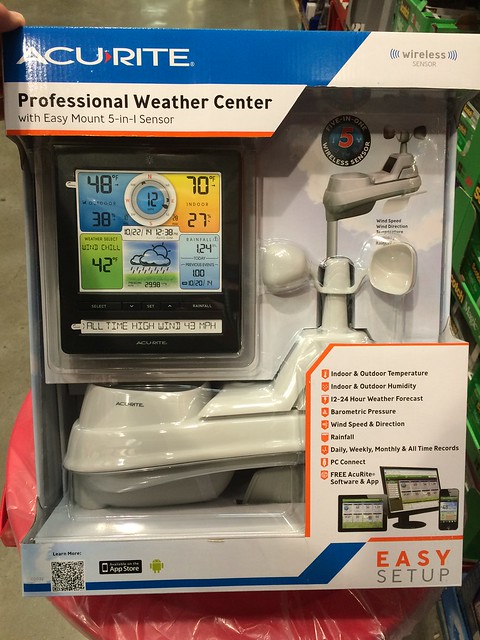
    This Christmas, I used my Christmas money to buy an inexpensive weather station from Costco.

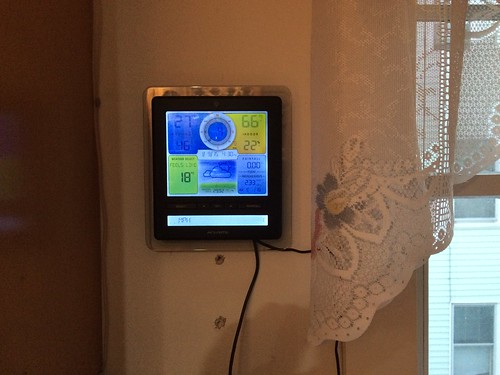
    It’s an Acurite 5-in-1 with a snazzy display.

    It provides the same basic instruments as the old station, but all the outdoor instruments are housed in a single package. This certainly makes installation easier, but the downside is that the location for each instrument is somewhat compromised. Your anemometer/wind vane is supposed to be up as high as possible, away from any obstructions. Temperature readings, on the other hand, are supposed to be taken at four feet above ground, and the instrument should be out of direct sun, yet away from buildings, etc. Similar for the rain gauge, etc. Oh well! I am just excited to have a weather station again!

    The console for this station can also be connected to a computer, and of course, you can run software on the computer to log the data, post to the internet, etc. This time, though, it’s not connected to a big, traditional PC, but rather to a Raspberry Pi,

    https://www.flickr.com/photos/tastewar/16054214030/

    so it’s very unobtrusive. We are using Meteohub software which is the only Linux package I could find that supports this station. You can view our weather data at The Weather Underground. Someday, we may re-create our own weather site as well.

  • Going out of Business!

    As a kid in high school, I loved reading through the catalogs that came in the mail. Biking catalogs were a favorite. Bike Nashbar and Performance Bicycle I remember. Campmor was another with all kinds of cool outdoorsy gear. But one of the most interesting that came in our mailbox was the Hidalgo Sunglasses catalog. It was printed on cheap newsprint, in black and white, but came loaded with interesting information about sunglasses, and prescription glasses as well. It had actual size pictures of the frames, so you could cut them out and try them on for size. Of course, back then I couldn’t afford anything in the catalog, but I learned a lot by reading it.

    Since the dawn of the web, I’ve kept looking for Hidalgo on the web, but they were very late to the game. They did finally arrive, however, in more of a “Web 1.0” style than the “2.0” that was gaining traction. It still looks rather dated, but is full of good information and you can still actually download the entire old fashioned catalog as a PDF. According to the Wayback Machine, they first had a web site around 2001, but it was just a handful of static pages until 2010, when you could finally order from it!

    I just visited again today, mostly to find the right URL to pass along to a friend, and discovered that Hidalgo is going out of business. Now I have to decide whether to buy a pair of sunglasses from them before they go out of business…

  • Trip Tech

    I used to have a Linksys Travel Router that I’d bring with me on trips. It was one I’d bought on eBay and had loaded special 3rd party firmware (dd-wrt) onto it. But it became unreliable. So naturally, I bought another one. But this time I decided not to complicate my life by changing the firmware on it.

    Well, this is now the first trip where I’m wanting to use it, and I was immediately reminded why I’d bothered with the alternative firmware in the first place: the original Linksys firmware had a nifty feature that let the router connect to one wifi network, but then offer a different one for its clients. That means that you don’t have to start connecting to new wifi nets on all your devices. Only the router needs to connect to the new one, and everything else connects to it. Problem is, the Linksys firmware only let you connect to open networks. So at some point I’ll have to invest the hours and anxiety to see if I can put better firmware on it.

    Our apartment was not advertised as having internet access, so I was anticipating having to find the occasional coffee shop (*not* hard to find here!) to stop in at and catch up on email, etc. Thankfully, it was just an oversight in the listing, because our phones, set to Airplane mode, are basically glorified iPods here in Canada, unless we want to pay roaming charges. Going without makes you realize how much we take for granted, and also how possible it is to do without.